Your Wix store collects email addresses at every turn — the checkout, the newsletter box in your site footer, the account signup, the contact form. Every fake or mistyped one you keep quietly chips away at the deliverability of the order confirmations and receipts you actually need to land. To verify emails from Wix today you don't install a one-click app: the native connector is on the way but not live yet. What you can do right now is just as effective — bulk-clean the customer list you already have, and verify new customers in real time through the API. This guide walks both, tuned for a store rather than a plain newsletter.
Why customer email quality matters for a store#
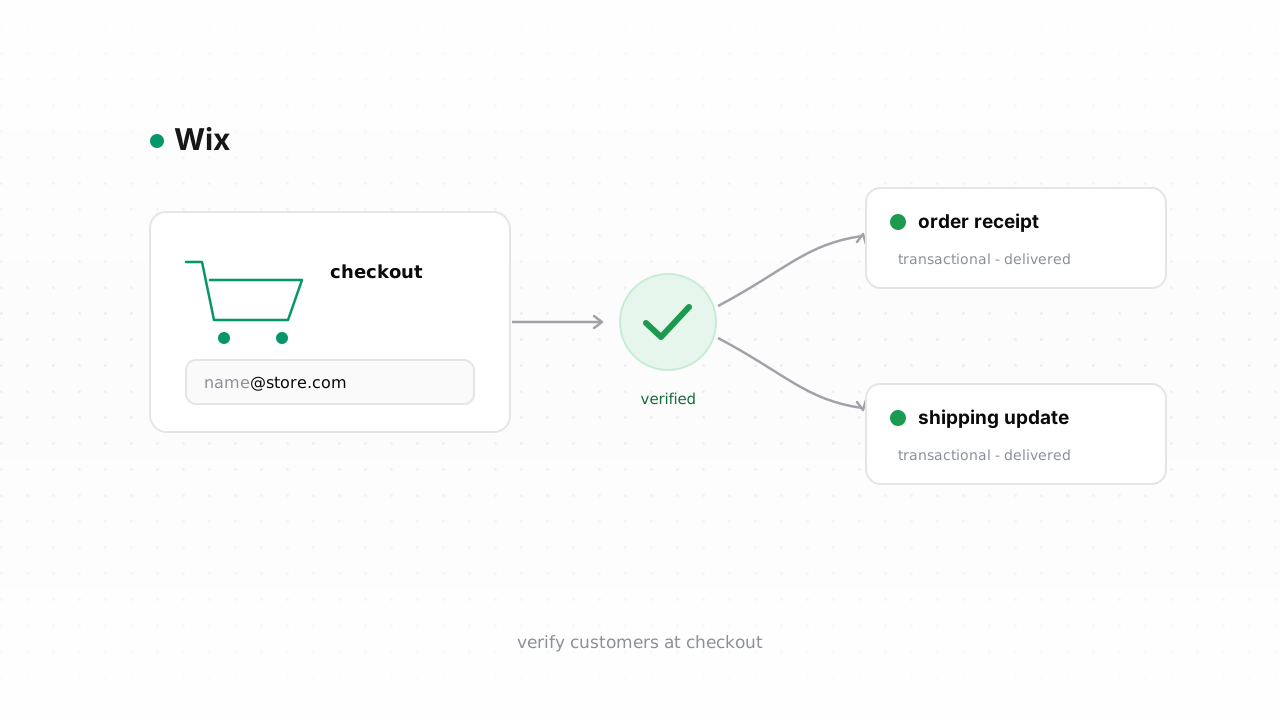
A Wix store isn't only a marketing list — it's a transactional sender. Order confirmations, payment receipts, and shipping updates all must land, and on a store they carry more weight than any campaign: a buyer who paid and never got a confirmation opens a support ticket, files a chargeback, or just doesn't come back.
Here's the catch that trips up most store owners. All of that mail — receipts and promotions alike — rides on the same sending domain and the same sender reputation. When a shopper fat-fingers gmial.com at checkout, or a bot stuffs a fake address into your popup, that message hard-bounces. Mailbox providers count those bounces against the domain doing the sending. Let enough of them pile up and the good mail starts landing in spam or getting deferred — including the receipt a real customer is waiting on. That's why a rising bounce rate matters more for a store than for a hobby list: the collateral damage includes order emails, not just open rates. Verification keeps the list you send to made of addresses that actually exist. If you're new to the topic, our email verification for ecommerce primer covers the wider stakes.
What Wix does and doesn't do about bad addresses#
Wix is honest about its lane, and it helps to know where that lane ends. Wix Contacts stores whoever comes through your store — buyers, subscribers, form fillers — and Wix email marketing (the built-in campaign tool) will suppress an address after it hard-bounces or after someone marks a message as spam, so it stops sending to a proven-dead address going forward.
What Wix does not do is check an address before it lands in your contacts. There's no pre-send validation at checkout or on your signup forms — a typo'd or disposable address is accepted, stored, and sent to at least once before Wix's own bounce handling reacts. That first bounce is the one that costs you reputation. Wix also won't tell you why an address is bad: you get "it bounced," not "this is a catch-all domain" or "this is a role inbox like sales@." And the suppression lives inside Wix's marketing tool — if you send transactional or campaign mail through another provider, that list of known-bad addresses doesn't follow. Verification fills the gap Wix leaves: catching the bad address before the first send, with a reason attached. Wix behavior above last verified against Wix's documentation, August 2026.
Step-by-step: export customers, verify, tag the risky ones#
If you've been selling for a while, your biggest and cheapest win is the list you already have. Wix makes the export straightforward.
- Export from Wix. In your dashboard, open Contacts (or CRM → Contacts). Optionally filter first — for example to subscribers, or to customers who ordered in the last year. Use the More Actions → Export option to download a CSV. The file includes each contact's email plus their subscription status.
- Bulk-verify the file. Upload the CSV to Qualisend's bulk verification — a single job handles up to 1,000,000 addresses, and duplicates are only charged once. Each row comes back with one of four verdicts —
deliverable,risky,undeliverable, orunknown— plus a reason code, a 0–100 confidence score, the MX provider, SMTP probe evidence, and sub-flags for catch-all, disposable, role, and full-mailbox addresses. - Suppress the undeliverables. Every
undeliverablerow is a proven dead address. Add these to the suppression or exclusion list in whatever actually sends your store's mail. Suppressing stops the sends that would otherwise bounce and drag your domain down. - Tag the risky ones — don't delete them.
risky, catch-all, and role addresses aren't dead; they're uncertain. Rather than dropping a possible paying customer, tag them in Wix (add a label likeverify-risky) and either send to them more cautiously or confirm them with a double opt-in. A catch-all domain accepts everything at the SMTP layer, so we can't prove the specific mailbox exists — see what a catch-all address is and our note on role, disposable, and free addresses for how to treat each bucket. - Keep the clean ones.
deliverablerows are safe to keep mailing. Re-run this whole loop on a schedule — how often to clean your list has a sane cadence for a store that's constantly adding contacts.
This CSV loop is the supported path today, and a native Wix connector is being built to automate it — sync contacts, verify, and write verdicts back without the manual export. Until it ships, the export-and-upload cycle above does the same job.
Verify new customers in real time#
Cleaning the list you have is half the battle; the other half is stopping new junk at the door. Because Wix accepts an address before you can check it, the durable fix is to verify at the moment a new customer appears and act on the result.
The cleanest way is a webhook on the "new contact" or "new order" event pointed at a small function you control. When Wix fires the event, your function calls the Qualisend REST API with the address, reads the verdict, and decides what to do: let deliverable through untouched, tag risky and catch-all results for a confirmation step, and flag undeliverable so you can prompt the shopper to re-enter a working email before the receipt is due. The API uses scoped keys, enforces rate limits, and can call you back via webhooks, so it slots into an event-driven flow without polling. Full request and response shapes are in the verification API docs.
Prefer not to write code? The same real-time check runs no-code through Zapier, Make, or n8n — trigger on a new Wix contact, add a Qualisend verification step, then branch on the verdict to tag or suppress inside Wix.
One more foundation while you're here: verification keeps bad recipients out, but your store's mail still needs to prove it's you. Make sure your domain is properly authenticated — set up SPF, DKIM, and DMARC for Wix — and read the email deliverability guide so the good addresses you worked to keep actually reach the inbox.
Frequently asked questions#
Does Qualisend have a native Wix integration?#
Not yet — the native Wix connector is being built and is coming soon. Today the supported path is the CSV loop (export your Wix contacts, bulk-verify, act on the verdicts) plus the REST API for real-time checks. When the connector ships on our Wix integration page it will automate the export-verify-write-back cycle, but everything in this guide works right now without it.
Can I verify an address before it enters Wix?#
Yes, and it's the best way to protect your store's reputation. Because Wix accepts an address before validating it, put a check at the moment a new customer appears: a webhook on the new-contact or new-order event that calls the verification API, or a no-code Zapier, Make, or n8n flow. Let deliverable addresses through, tag risky ones for confirmation, and flag undeliverable so you can ask the shopper to re-enter a working email before their receipt is sent.
Why does one fake checkout email hurt my whole store?#
Because your receipts, shipping updates, and campaigns all send from the same domain and share one sender reputation. A fake or typo'd address hard-bounces, mailbox providers count that bounce against your domain, and enough of them push your good mail — including order confirmations — toward spam or deferral. Keeping bad addresses out protects the transactional mail customers actually need.
What do Qualisend's four verdicts mean for my customer list?#
Deliverable means the mailbox exists and is safe to keep mailing. Undeliverable is a proven dead address — suppress it. Risky is uncertain (often a catch-all, role, or full mailbox) — tag it and confirm rather than blindly send or delete. Unknown means the check was inconclusive, usually a temporary server issue worth re-running. Each verdict carries a reason code, a 0–100 confidence score, MX and SMTP evidence, and sub-flags so you can decide per address.
How much does it cost to try on my Wix list?#
The free plan includes 100 one-time credits that never expire, which is enough to verify a small list or test the API against your store's contacts. A single bulk job scales to 1,000,000 addresses, and duplicate addresses in a file are only charged once — handy for a store where the same shopper may appear on several rows.