Every email platform sorts failed deliveries into two piles, and the pile an address lands in decides what happens to it next. The hard bounce vs soft bounce split sounds simple: a hard bounce is permanent, a soft bounce is temporary. In practice the codes are messier than the labels, and the costly mistakes happen in the gray areas: a policy block filed as a hard bounce, a mailbox that has been "full" for months, a soft bounce that quietly repeats on every send. This guide gives you plain definitions, a code-by-code table, and a handling policy you can adopt today.
The short answer#
A hard bounce means the message can never be delivered to that address: the mailbox doesn't exist, the domain doesn't exist, or the account has been disabled. Suppress the address after the first one. A soft bounce means delivery failed for now: the mailbox is full, the server is busy, or it's deferring senders it doesn't know yet. Let your platform retry, and suppress the address only if it keeps soft-bouncing across several separate sends.
The SMTP code tells you which is which: 5xx is permanent, 4xx is temporary.
The exception you can't afford to miss is 5.7.x. That code is a block against
you (your reputation, content, or authentication), not a verdict on the
address, and suppressing the recipients won't fix it.
What is a hard bounce?#
A hard bounce is a permanent delivery failure. The receiving server looked at the recipient and refused, and sending again won't change its answer. The usual causes:
- The mailbox doesn't exist. It never did (a typo, a made-up signup) or it no longer does (an employee left, an account was closed).
- The domain doesn't exist or has no mail server. Often a misspelled domain
like
gmial.com, or a company domain that lapsed after a rebrand. - The account has been disabled. Providers deactivate accounts, often after long inactivity, and reject mail to them from then on.
Every hard bounce tells mailbox providers you mailed an address you couldn't vouch for. One is noise. A steady stream reads as a stale or careless list, and that's a sender reputation problem for every message you send, not just the ones that bounced.
What is a soft bounce?#
The soft bounce meaning, in one line: delivery failed for a reason that may go away. The address might be perfectly good. Common causes:
- The mailbox is full. The owner can delete mail and it will accept messages again.
- The receiving server is down, overloaded, or unreachable.
- Greylisting. The server defers mail from unfamiliar senders once and accepts the retry a few minutes later.
- Throttling. The provider is limiting how fast it accepts your mail, usually because of a volume spike or a reputation dip.
Sending servers retry soft bounces automatically, for hours or a few days depending on the platform, so many of them end in delivery without you doing anything. Some platforms call a failure that's still being retried a "deferral" and only log a soft bounce once they give up, which is why two tools can report different soft-bounce counts for the same send.
How to tell them apart: read the code#
Open the bounce details in your email platform. Most show a "bounce reason" or "diagnostic code", which is the raw reply from the receiving server:
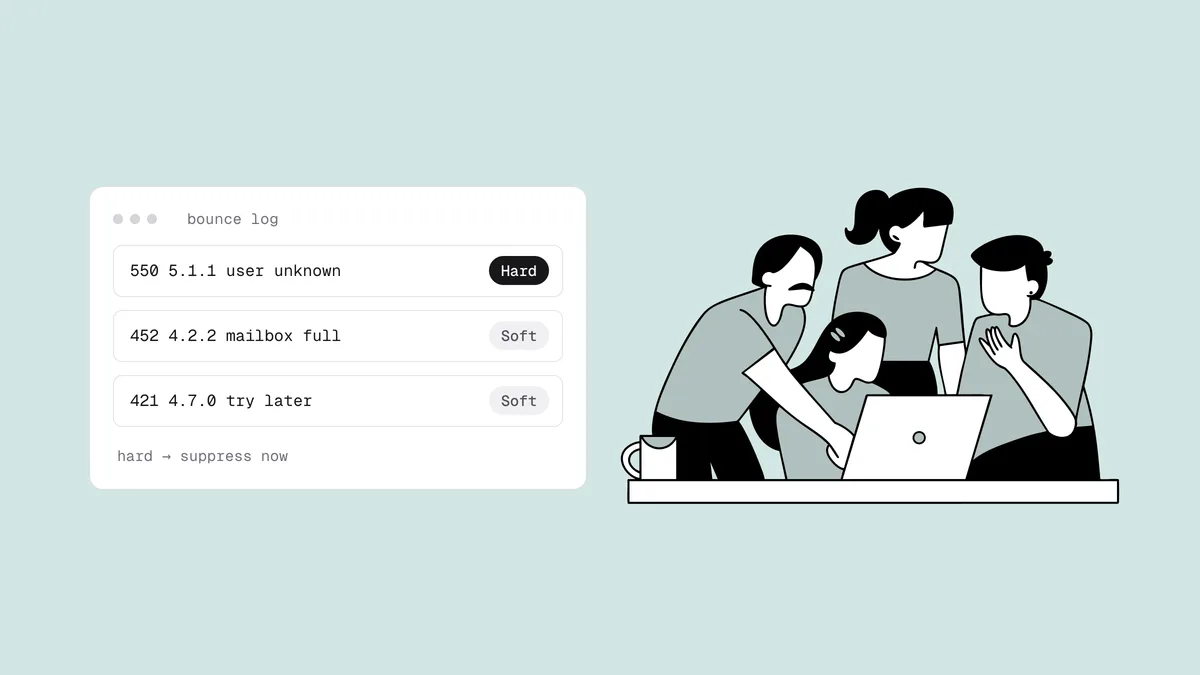
550 5.1.1 The email account that you tried to reach does not exist.
That reply has three parts: the basic code (550), the enhanced status code
(5.1.1), and human-readable text. The first digit of either code is the
headline: 5 is permanent, 4 is temporary. The middle number of the enhanced
code says what the failure is about: x.1.x the address, x.2.x the mailbox,
x.3.x the mail system, x.4.x the network, x.7.x security or policy. The
wording varies from provider to provider, so trust the codes over the text.
The SMTP response codes guide covers the full grammar, and the free SMTP code lookup translates any reply you paste into it. These are the codes marketers run into most:
| Code | What it usually means | Hard or soft | What to do |
|---|---|---|---|
5.1.1 (often with 550) | The mailbox doesn't exist: "user unknown", "no such user" | Hard | Suppress after the first bounce. |
5.1.2 | The domain doesn't exist or can't receive mail | Hard | Suppress. If the domain is an obvious typo, ask the person for the right address instead of editing it yourself. |
5.2.1 | The mailbox exists but is disabled | Hard in practice | Suppress. Disabled accounts rarely come back. |
4.2.2 (often with 452) | Mailbox full | Soft | Let retries run. Suppress if it's still full after several sends. |
5.2.2 (often with 552) | Mailbox full, reported with a permanent code | Treat as soft | Same as 4.2.2. The standard calls a full mailbox a
persistent temporary failure. |
5.3.4 (often with 552) | Your message is larger than the server accepts | Neither: it's the message | Shrink attachments or images. Don't suppress the address. |
5.7.1, 5.7.26 and other 5.7.x | Blocked by policy: reputation, content, a blocklist listing, or failed authentication | Permanent code, but not about the address | Don't suppress the recipients. Fix the cause, then resume. |
4.7.x (often with 421 or 451) | Greylisting or throttling: "try again later" | Soft | Let retries run. If it hits a whole provider on every send, look at your reputation. |
4.4.1, 4.4.7 | The server couldn't be reached, or your sender gave up after its retry window | Soft | Ignore one-offs. If one domain fails for days, check its MX records. |
Servers don't always use codes precisely. Some send a bare 550 for a policy
block, and some send a 5xx with text that clearly describes a temporary
problem. When the basic code, the enhanced code, and the text disagree, the
enhanced code and the text usually tell the truer story.
The tricky cases#
A 5.7.x block is about you, not the address#
A 550 5.7.1 starts with a 5, so plenty of platforms count it as a hard bounce.
But the server isn't saying the mailbox doesn't exist. It's refusing your
mail: your sending IP or domain is on a blocklist, your reputation with that
provider has dropped, your content tripped a filter, or your authentication
failed. Gmail, for example, uses 5.7.26 for mail that fails authentication
checks.
The giveaway is the pattern: a block hits many recipients at one provider at once, and real mailboxes don't all die in the same minute. Suppressing them throws away subscribers who still want your mail and leaves the block in place. Read the bounce text, which often names the blocklist or links to the provider's policy page. Then check whether you're blacklisted, confirm your SPF, DKIM, and DMARC are passing, and follow the delisting steps if a listing is the cause. Once the block lifts, those addresses are mailable again.
Mailbox full that never clears#
A full mailbox is the textbook soft bounce: the address exists and the owner can make room. But an inbox sometimes fills up because nobody reads it anymore. If an address answers "mailbox full" on every send for weeks, treat it as abandoned. Providers eventually disable abandoned accounts, at which point the address starts hard-bouncing, and some recycle long-dormant addresses as spam traps. Suppress a persistently full mailbox before either happens.
Greylisting and throttling look identical in a report#
Both arrive as 4xx replies with 4.7.x codes, and both say "try again later".
Greylisting is a one-off toll: the server defers an
unfamiliar sender, accepts the retry, and usually remembers you afterward.
Throttling is the provider rationing your mail. You never need to act on an
individual greylisting bounce. Throttling that shows up across an entire
provider, send after send, is an early reputation warning: slow down, check your
complaint rate, and look at what Google Postmaster Tools
says about your domain.
Soft bounces that keep repeating#
One soft bounce means nothing. The same address soft-bouncing on five campaigns in a row is a dead address in disguise: an abandoned mailbox, a mail server that's gone, a half-configured domain. Many platforms convert these to hard bounces after a run of failures; if yours doesn't, the policy below does.
Bounces that arrive after "delivered"#
Some servers accept a message first and reject it later, sending a bounce message back minutes or hours afterward. Corporate security gateways and catch-all domains often work this way, so your platform may log the message as delivered and then as bounced. Handle the late bounce exactly like an immediate one with the same code.
Auto-replies aren't bounces#
Out-of-office replies and "I've left the company" notices are delivered mail, not bounces. The out-of-office address is fine. The "I've left" reply is an early warning that the mailbox will start hard-bouncing soon, so update or retire the contact now. In a sales database, it's also a cue to find the replacement, a habit covered in CRM data hygiene.
A bounce-handling policy you can adopt#
Write the rules down once so nobody decides per address. A sensible default:
| What happened | Rule |
|---|---|
Hard bounce (5.1.1, 5.1.2,
5.2.1) | Suppress permanently after the first one. No retry, no second chance. |
| Single soft bounce | Do nothing. Let the platform retry. |
| Repeated soft bounces | Suppress after 3 to 5 consecutive soft bounces across separate sends. |
| Mailbox full for weeks | Suppress, or move it into your sunset policy with other inactive addresses. |
Policy block (5.7.x) | Don't suppress. Fix reputation, authentication, or content, then resume. |
| Message too large | Fix the message. The address is fine. |
A few details make the policy work:
- 3 to 5 is common practice, not a law. Pick a number and apply it consistently. Lower is safer for a sender with little reputation to spare.
- "Consecutive" means a successful delivery resets the count, and you count separate sends, not your platform's automatic retries of one message.
- Suppress, don't delete. A suppressed address stays on file, so a future import can't quietly add it back.
- Take your suppression list with you. It doesn't migrate on its own when you change platforms, which is one of the first steps in switching email providers safely.
If your team processes bounces in code rather than in a platform dashboard, building a bounce classifier turns these same rules into a function.
What your email platform does automatically#
Most email platforms already run a version of this policy for you:
- Hard bounces are suppressed automatically, usually after the first one.
- Soft bounces are retried over a window of hours to days, and an address that keeps failing is eventually converted to a hard bounce or suppressed. The exact thresholds vary and aren't always documented.
- Policy blocks are handled inconsistently. Some platforms keep a separate
"blocked" category for
5.7.xrejections and leave the address active; others file them as hard bounces. Find out which yours does. If it lumps them together, one block event can suppress hundreds of real subscribers.
What no platform can do is suppress an address before its first bounce. By the time any automatic rule fires, the bounce has already counted against you.
Why the hard bounce count is the one to watch#
Hard bounces drive the reputation damage, so track the hard-bounce rate on its own rather than blended with soft bounces. Under about 2% is normal, 2% is a warning line, and many platforms treat around 5% as grounds for throttling or suspending an account. A list that's verified at signup and re-cleaned regularly typically runs well below 1%. To see where yours sits, run the numbers through the bounce rate calculator and compare them with the bounce rate benchmarks by industry. For why providers weigh this number so heavily, see why bounce rate matters.
Prevent both before you send#
Verification moves the bounce decision to before the send: an SMTP mailbox check asks the receiving server whether the mailbox exists, without sending an email. Qualisend's four verdicts line up with the bounce types above:
- Undeliverable covers tomorrow's hard bounces: rejected mailboxes, domains
with no mail route, invalid syntax, and disabled accounts (the
disabledsub-flag). Suppress them before they ever count against you. - Risky with
full_mailboxcovers tomorrow's soft bounces. Send with care and re-check on your next clean. Still full means probably abandoned. - Risky with
catch_allmeans the server accepts everything, so the mailbox can't be confirmed. Keep these in their own throttled segment. - Unknown means the server never gave a conclusive answer, often because of greylisting. Re-verify later rather than suppressing. Unknown verdicts are refunded.
A check at signup also catches typos with a "did you mean" suggestion
(gmial.com becomes gmail.com), and the most common email typos
are predictable enough to stop at the form. For lists you already have, the
email list hygiene checklist covers the full
routine, and Qualisend's one-page list health report grades a list's bounce
risk as Healthy (under 2%), Needs attention (2 to 5%) or At risk (above 5%). If
your contacts live in an email platform, the native integrations
clean them in place and write the verdicts back as tags or fields.
Verification can't prevent a 5.7.x block, which is about your sending, and
addresses can still die between your last check and your next send. That's why
you want both verification and a written bounce policy.
Frequently asked questions
01What is the difference between a hard bounce and a soft bounce?
A hard bounce is a permanent failure: the mailbox or domain doesn't exist, or the account is disabled, and the server answers with a 5xx code such as 5.1.1. A soft bounce is a temporary failure, such as a full mailbox, a busy server, greylisting, or throttling, and arrives as a 4xx code. Suppress hard bounces right away; let soft bounces retry.
02What is a soft bounce, and should I worry about it?
A soft bounce is a delivery attempt that failed for a reason that may go away, so your platform retries it automatically. A single one isn't worth worrying about. Pay attention when the same address soft-bounces on several sends in a row, or when throttling replies hit an entire provider at once, which points to a reputation problem rather than a bad address.
03How many soft bounces before I should remove an address?
There's no universal number. A common practice is to suppress an address after 3 to 5 consecutive soft bounces across separate sends, with any successful delivery resetting the count. A mailbox that has been full for weeks is a good candidate to remove sooner, because abandoned inboxes are eventually disabled or recycled.
04Should I remove addresses that bounced with a 5.7.1 error?
No. A 5.7.x code means the receiving server refused your mail for policy reasons, such as a blocklist listing, poor reputation, content filtering, or failed authentication. The addresses are usually fine. Read the bounce text, check your blacklist status, fix authentication or the listing, and resume sending once the block lifts.
05Can a hard bounce ever be a mistake?
Yes, in two main cases: a policy block that your platform filed as a hard bounce, and a rare misconfiguration on the receiving side. If a valuable contact hard-bounced but you have reason to think the address is live, for example they recently replied from it, verify it and confirm through another channel before you remove it from suppression.
Want to catch hard bounces before they happen? Check a single address with the free email checker, or verify a whole list with 100 free credits that never expire.